Your senior staff answer the same 30 questions. Every single week.
James Whitfield, a senior partner at Thornfield Advisory, fielded the same questions every week — where's the onboarding checklist, what's the standard fee structure, which engagement template should I use. Eight years of institutional knowledge existed across Confluence, Google Drive, and SharePoint, but finding any of it meant interrupting someone who already knew. We connected every document source, mapped who could see what, and delivered answers in Slack in under 10 seconds — cited, permission-aware, auditable. After 90 days, the system surfaced 14 processes that had never been documented anywhere.
Composite scenarios: fictional companies, written to illustrate what our platform is designed to do. The figures are design targets, not measured client results.
Screen recording coming soon
When Knowledge Lives Inside People
Thornfield Advisory had grown from 40 people to 165 in six years. The knowledge that built the firm — how engagements were scoped, how clients were onboarded, how deal memos were structured — was documented in bursts, by whoever had time, in whatever tool was current. By 2024, institutional knowledge was scattered across three Confluence spaces, two Google Drive folders, a SharePoint left over from an acquisition, and the heads of seven senior partners who had been there from the beginning.
The Senior Partner
- Fourteen Slack messages before 10am. Twelve of them are questions a junior analyst could answer — if they knew where to look. The answers exist in documents nobody can find.
- "What's our standard NDA turnaround?" is asked seventeen times a month. The answer is in a Confluence page from 2019. Nobody knows it exists.
- Three hours per week answering questions that are not in anyone's job description to answer — including mine. That is 150 hours per year of senior partner time spent being a search engine.
The New Analyst
- Week one: asked three questions before realising the answer was "ask Sarah." Week three: realised Sarah doesn't always know either — she asks David. Week six: stopped asking and started guessing.
- The onboarding documentation says "see Confluence." Confluence has 847 pages across three spaces. Searching returns 40 results sorted by last-modified date with no signal for which is current.
- Made a client onboarding error in month two. The correct procedure was documented — in a page nested four levels deep under a space created for a project that ended in 2021.
Six Stages From Documents to Intelligence
The system does not replace documentation. It makes existing documentation findable, citable, and queryable — by anyone with the right permissions. Total AI cost for 165 users asking approximately 400 questions per month: under $0.80.
The Knowledge Pipeline
Connect
The system connects to Confluence, Google Drive, and SharePoint via their APIs. Every document is ingested — pages, PDFs, spreadsheets, slide decks. New and updated documents sync automatically. Deleted documents are removed from the index within the next sync window. The system is always current.
Map Permissions
Before a single chunk is embedded, permission metadata is extracted from the source system. A Confluence page restricted to Deal Team Alpha stays restricted. A Google Drive folder shared with All Staff is available to everyone. Permission groups mirror the organisation's actual access controls — not a separate permission layer that drifts out of sync with the source.
Chunk and Embed
Documents are split into overlapping 800-token chunks with 200-token overlap. Each chunk is embedded using OpenAI text-embedding-3-small (1,536 dimensions). Chunks carry their source document, section heading, last-modified date, and last-modified author as metadata. Every retrieved answer traces back to its origin.
Retrieve
When a user asks a question, the query is embedded and the closest chunks are retrieved — filtered at the database query level by the user's permission groups. The retrieval never surfaces documents the user cannot access, regardless of how the question is phrased. Permission is enforced in the SQL, not the prompt.
Respond
Retrieved chunks are passed to Claude Haiku with one hard constraint: answer only from the provided context. If the context does not contain a clear answer, say so. Every response includes citations: document title, section heading, author, and last-modified date. The AI is a librarian. It does not guess.
Learn
Every query that returns low confidence or no relevant documents is logged anonymously. Every 30 days, recurring low-confidence query topics are clustered and surfaced to the knowledge manager as a gap report. The system does not just answer questions — it maps where answers do not exist.
Wednesday Morning at Thornfield
Why Permission Lives in the Database, Not the Prompt
The first version of the retrieval system filtered permissions in the application layer — retrieve documents, then check access. It worked perfectly in testing. The problem was architectural: a carefully crafted prompt injection could instruct the LLM to ignore the application-layer filter and include restricted documents in the response. Moving permission filtering into the SQL query means the database physically never returns documents the user cannot access. No prompt, however crafted, can surface a document that was never included in the query result. The performance cost: 12 milliseconds per query. The security gain: an enforced boundary that cannot be bypassed at the application layer. We rebuilt the retrieval layer on day three of development. That decision has not been revisited.
The System
Three document sources flow through a permission-aware pipeline into a single vector store. Every query is filtered at the database level before the AI ever sees a result. Three interfaces share one knowledge layer.
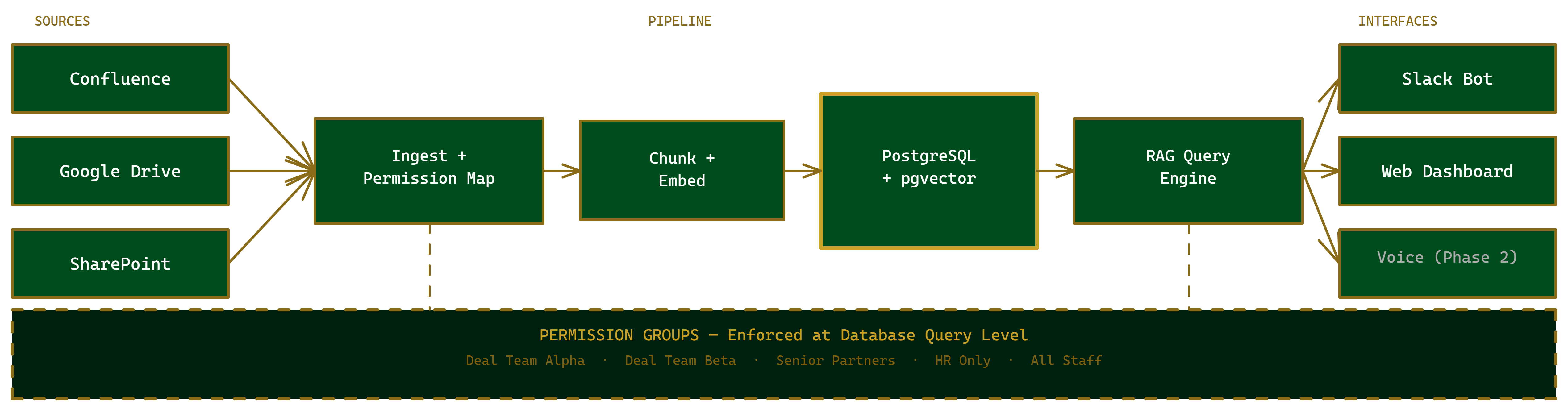
Permission filtering happens at the SQL query layer — not in the prompt, not in application code.
Four Decisions That Defined the System
Every knowledge system faces the same tensions: completeness vs. freshness, confidence vs. coverage, automation vs. trust. Here are the four decisions that shaped how this system behaves — and why each was harder than it looks.
Citations are non-negotiable
Every answer includes the source document, section heading, author, and last-modified date. We tested a version without citations — cleaner UI, faster responses. Trust dropped measurably in one week. People do not believe answers from a source they cannot verify. The citation requirement also enforces honesty: if the system cannot cite a source, it cannot give a confident answer. The constraint made the AI more reliable, not just more transparent.
Confidence scoring drives documentation behaviour
Every response carries a confidence level: high (direct quote from a specific document), medium (synthesised from multiple documents), or low (limited supporting context). Low-confidence responses render differently — amber indicator, prompt to verify. In month one, 7% of responses were low-confidence. By month three, after the firm used gap reports to fill documentation holes, that dropped to 2.1%. The scoring did not just signal uncertainty — it drove the firm to close its own gaps.
The AI knows when not to answer
A pre-query classifier runs before retrieval on every question. Queries touching HR disputes, individual performance, or personal circumstances are intercepted — the system acknowledges the topic and routes to a human rather than searching documents. This feature took two hours to build. It generated more trust from the HR team than the entire RAG pipeline. The exact phrase from the review call: "The AI knows when not to answer." Trust is built by knowing your limits, not by answering everything.
The gap report was the unexpected product
Every low-confidence or no-result query is logged anonymously. Every 30 days, recurring query topics are clustered by embedding-based similarity. At the 90-day review, the gap report showed 14 topic clusters with high query frequency and low documentation coverage. The knowledge manager recognised 11 of them immediately: "That's how we handle conflict of interest disclosures — it's never been written down, we just ask Marcus." The AI's inability to answer became a map of undocumented institutional knowledge. The firm ran a documentation sprint in Q4 using the gap report as the agenda.
Permission in Practice
Same query. Two users. Completely different result sets — because the database never returns documents the user cannot access.
Same query. Same AI. Different permissions — enforced at the SQL query layer, not in the prompt.
What We Learned
Lessons Learned
Permission is architecture, not a feature
We designed the permission model on day one and rebuilt the retrieval layer on day three when we realised the first implementation was not architecturally enforced. Every hour spent getting permission right in the data layer saved ten hours of potential re-architecture — and prevented one category of serious data exposure. In knowledge systems handling commercially sensitive information, permission is not a layer you bolt on. It is the foundation the rest of the system stands on.
The citation requirement changed how the AI behaves
Requiring citations did not just make answers more trustworthy — it made the AI more honest. When retrieved context does not support a confident answer, the system cannot fabricate a citation, so it says it does not know. The citation constraint became an honesty constraint. Reliable, in this context, means "it tells me when it doesn't know." That is a harder and more valuable property than answering correctly.
The gap report outperformed the query engine strategically
We built knowledge gap detection as an afterthought — one day of engineering. It is the most strategically valuable output in the design. Senior partners with no interest in "the AI search tool" care a great deal about a report showing which processes are undocumented. The gap report reframes the system from a search tool to an institutional knowledge audit.
What I'd Improve
- Multi-turn conversation context — follow-up questions that reference earlier answers within the same Slack thread
- Stale document detection — flag high-citation documents that have not been updated in over 12 months
- Voice interface — the same knowledge base, same permission model, accessible via phone for field teams
- Knowledge manager dashboard: query volume by topic, citation frequency by document, engagement heatmap by team
AskBase Connects to Everything
The knowledge base is not an island. When a workflow needs an answer — InboxPilot classifying a tenant's lease question, a proposal agent pulling past engagement context — it queries AskBase through the same permission-aware API. When WatchBase detects a regulatory change, the new document enters the knowledge pipeline automatically. When DocBase generates a proposal, AskBase supplies the institutional knowledge that makes it specific. These aren't separate products — they're the same intelligence layer, called from different directions.
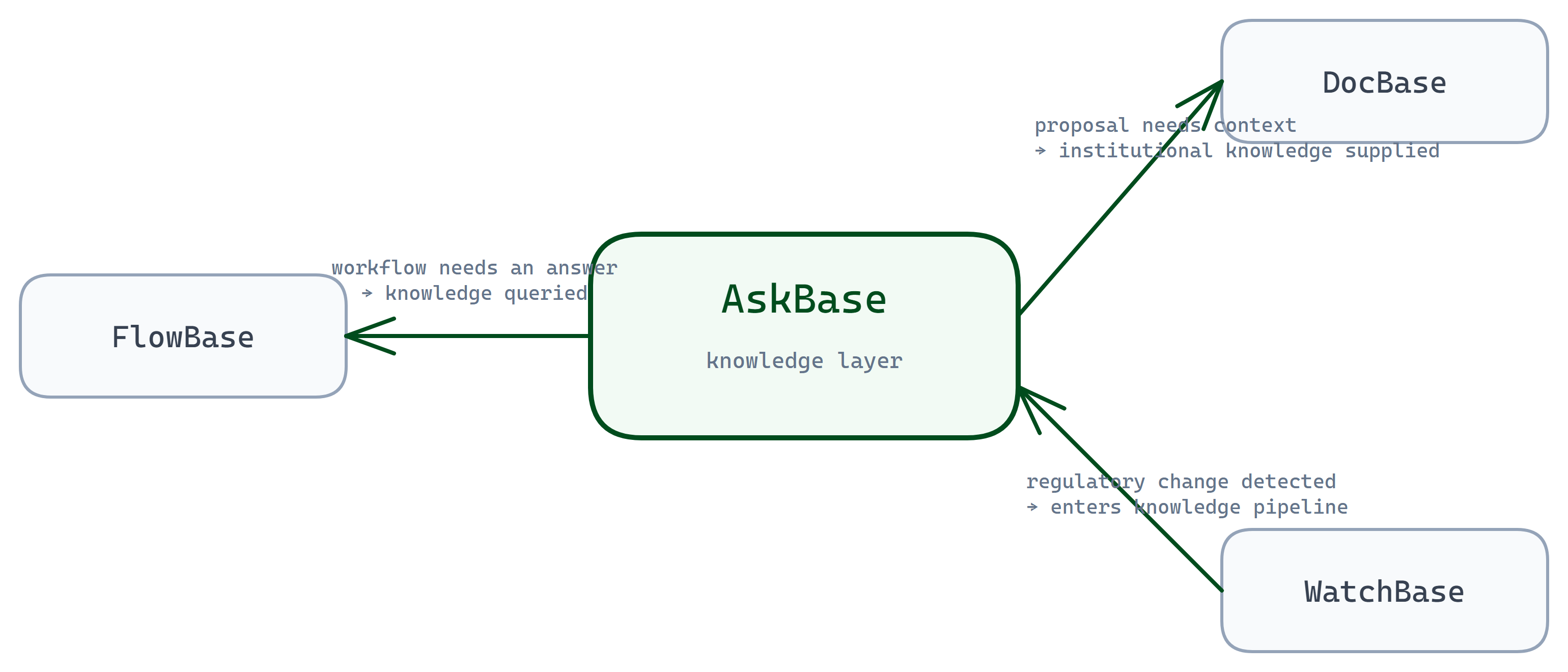
AskBase is the knowledge layer. The other platforms are what calls it — and what feeds it.